Stage colours by position
The first stage gets the first colour, the second the next, and they repeat after the last one. Nothing is tied to stage names, so every pipeline in every sub-account picks up the design.
Theme
Colour
Saved on this device only, and only if you accepted preference storage.
GHL Customizer · Opportunities board
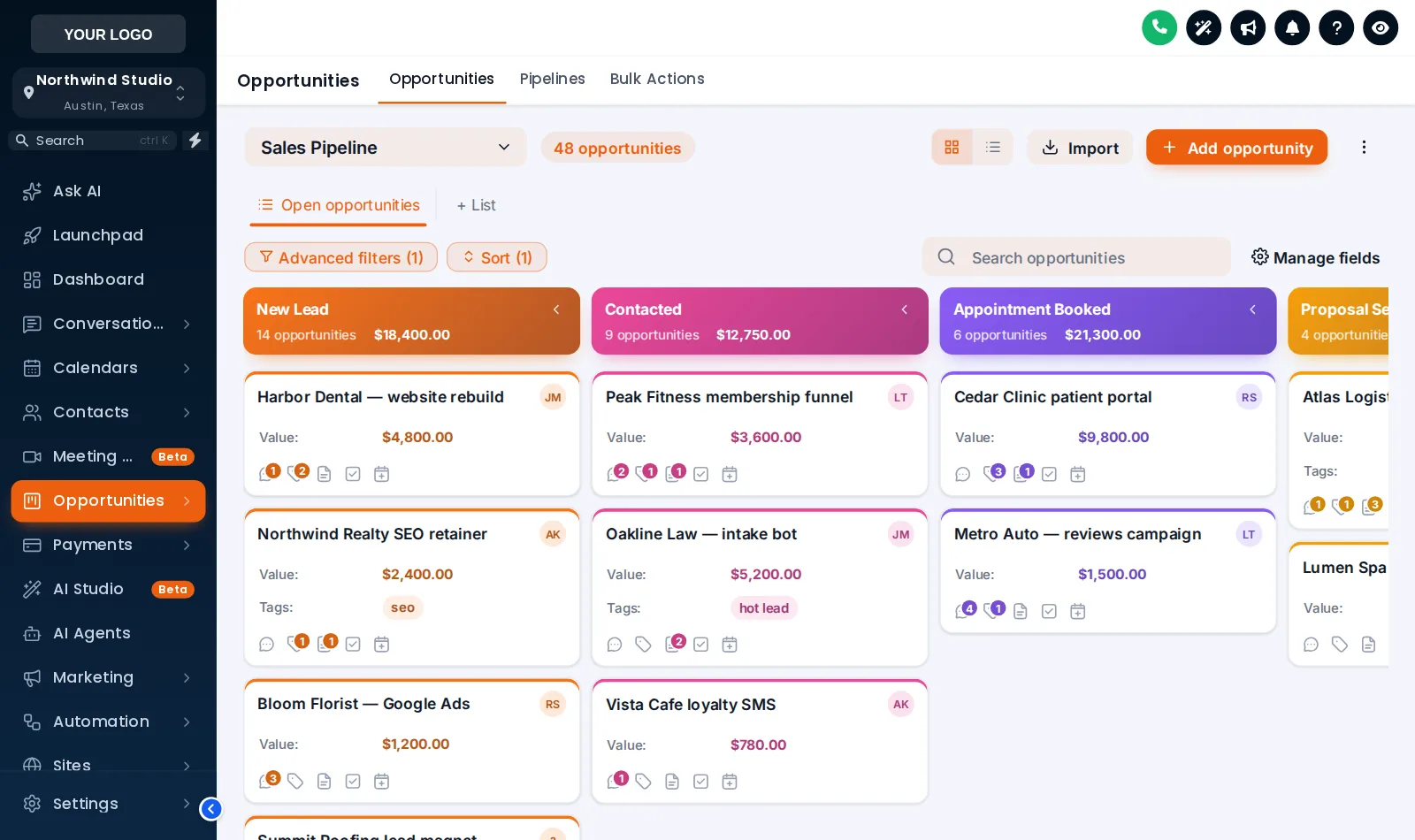
Your clients move deals across the opportunities board all day. Choose one of 12 board designs and the stage columns, deal cards, toolbar and list view take on your look, with each stage in its own colour.
Beta · Free Free during beta, every feature included.
Why it matters
On the stock board, New Lead and Won look alike: grey columns and white cards. Colour and a little structure make it easy to see at a glance where deals are piling up.
Stock GoHighLevel
With the GHL Customizer
Live preview
All 12 designs on a sample sales pipeline. Click one and the board restyles itself. Scroll the board sideways to see every stage.
Loading the live preview
Clean Light A copy of the GoHighLevel opportunities board with a sample sales pipeline, restyled by the real engine. Stage colours follow each column’s position, so your own pipelines pick them up whatever their stages are called.
What you get
The first stage gets the first colour, the second the next, and they repeat after the last one. Nothing is tied to stage names, so every pipeline in every sub-account picks up the design.
Headers as cards, plain, tinted, filled or underlined, a colour dot, deal counts as text or a badge, and column backgrounds that are soft, tinted, glass or outlined.
Background, border, radius, shadow and hover, the stage colour as a stripe or a dot, optional tinted cards and three densities from compact to spacious.
Cards never move on hover, so dragging a deal to another stage stays as exact as in stock GoHighLevel.
The deal value in bold and in the stage colour, with your own colours for deal names, field labels and values.
The pipeline picker, filters, search and buttons above the board in soft, pill, glass, outline or bold, and the list view restyled to match.
Light boards on solid, gradient or mesh backgrounds, and dark boards with light text on dark columns and cards.
Screenshots
Gradient Headers: a colour for every stage
Clean Light: soft lanes and a dot per stage
Midnight Neon: a dark board with glowing stage lines
Candy Pastel: each lane in its own pastel
Obsidian Gold: black and gold
Neo Brutal: thick outlines and loud stage colours
Frosted Glass: see-through lanes on a colour mesh
How it works
Open the Opportunities tab in the theme editor, switch on the restyle and click a template.
Keep the template’s stage colours, build them from your brand colour or pick each one yourself.
Every sub-account’s board picks up the design on its next page load. No pipeline settings change.
Questions
No. It only changes how the board looks in the browser. Pipelines, stages, deals and automations stay exactly as they are.
Colours are given out by column position, not by stage name: first stage, first colour, and so on, repeating after the last one. Any pipeline with any number of stages gets a colour for every column.
Yes. Cards stay in place on hover and the board keeps GoHighLevel’s own drag and drop, so moving deals works as before.
Yes, when you want it. The table behind GoHighLevel’s list toggle can follow the same design. The preview here shows the board view.
Yes. Both have matching templates, such as Midnight Neon, Obsidian Gold, Ocean Pro and Brand Match, and both can build their colours from your brand colour.
Sign in, try opportunities board on your own brand and paste two lines into GoHighLevel. No card, no plans to pick.
Reading settings