Quick tags
One-tap chips for the tags you use most. A chip shows whether the contact has the tag, with its own colours for added and not yet added, and taps again to remove it.
Theme
Colour
Saved on this device only, and only if you accepted preference storage.
GHL Customizer · Contact actions
Add a bar of buttons and quick tags to the contact page. One tap adds or removes a tag to start a workflow, a button can open a short form that fills in custom fields, and the contact updates straight away.
Beta · Free Free during beta, every feature included.
Why it matters
Tagging a contact to start a workflow means opening the tag box, typing, picking and checking you got it right. Updating a few fields means scrolling through the whole record. Buttons on the contact page turn the jobs your team does every day into one tap.
Stock GoHighLevel
With the GHL Customizer
Live preview
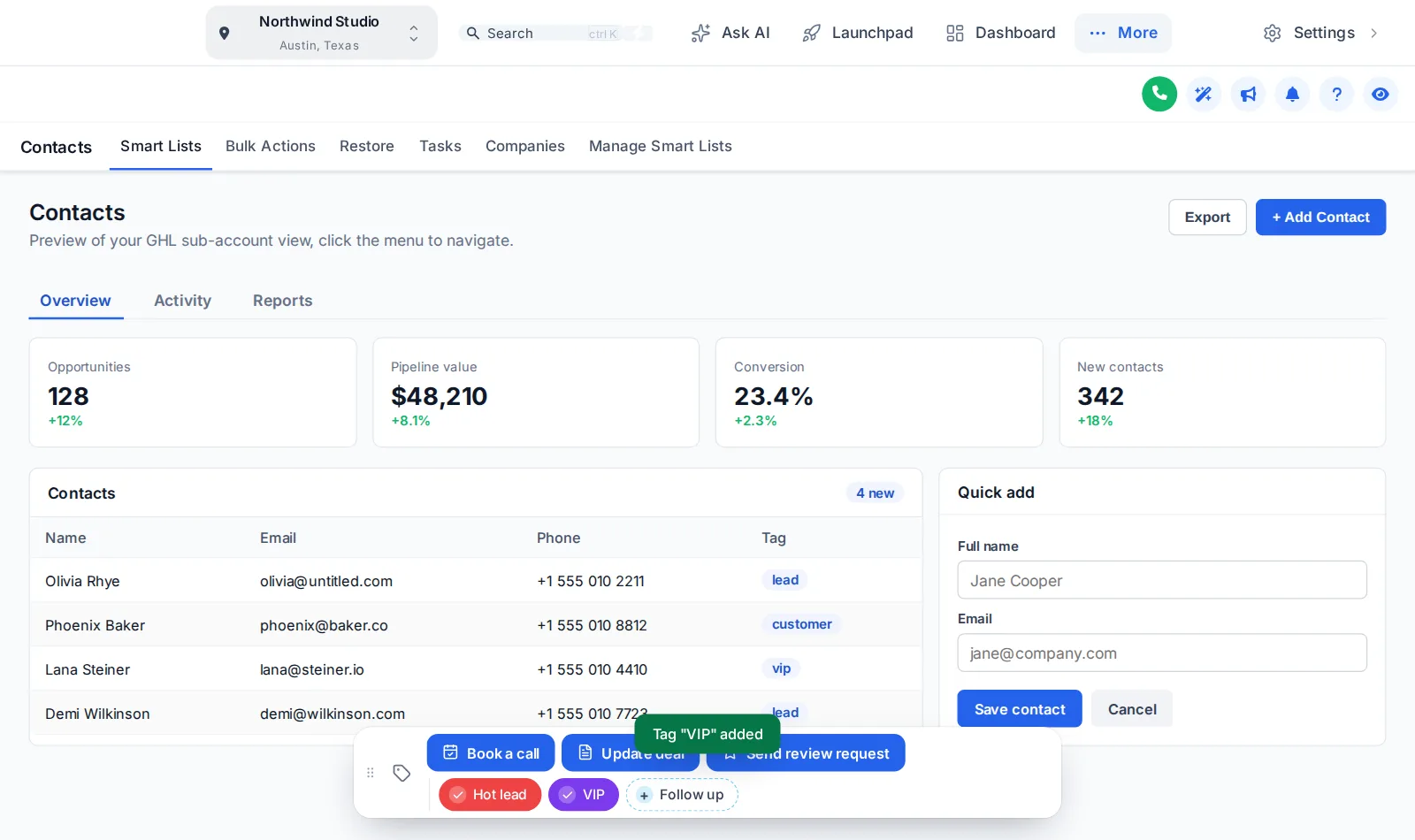
This is the real contact actions bar on a sample page. Tap a quick tag, open the Update deal form, move the bar by its grip, and switch colours and positions with the chips.
Loading the live preview
A colour per tag This is the real contact actions bar. Tap a quick tag to add or remove it, press Update deal to open its form, or drag the bar by its grip. In the preview nothing is saved; inside GoHighLevel the contact updates straight away.
What you get
One-tap chips for the tags you use most. A chip shows whether the contact has the tag, with its own colours for added and not yet added, and taps again to remove it.
A button can add tags, remove tags or toggle one, so a single press starts the workflow that listens for that tag.
A button can open a short form: text, paragraph, number, date, drop-down, email, phone or link, each one mapped to a custom field on the contact.
Set the message shown when a tag is added or removed, for all chips or for each one, and a success message for every button.
Optionally add a note to the contact each time: which tag was added or removed and by whom, or which field changed from what to what.
Pick one of 6 starting positions. People can drag the bar wherever suits them, it remembers the spot, and a double-click on the grip puts it back.
The contact page shows the new tags and field values straight away, with no reload. If GoHighLevel refuses a change, the chip flips back and says why.
Show a chip or a button in every sub-account, or only in the ones you list.
Screenshots
Buttons and quick tags, with a message when a tag is added
A button opens a short form that fills in custom fields
Quick tags in green when added and grey when not
How it works
In the Contact actions tab, add the quick tags and buttons your team needs, with colours, icons and messages.
Point each button at the tags your GoHighLevel workflows listen for, or at the custom fields a form should fill in.
The bar appears on every contact page, in the sub-accounts you chose, on the next page load.
Questions
Through GoHighLevel’s own API, with the signed-in user’s session, the same calls GoHighLevel’s interface makes. So a user can only do what their GoHighLevel permissions already allow.
Yes. Buttons add, remove or toggle tags, so any workflow with a "tag added" or "tag removed" trigger starts from one press.
Any custom field in the sub-account, found by its name, its key or its id. Each form field is linked to one, with a type such as text, paragraph, number, date, drop-down, email, phone or link, and can be required.
If you want one. Notes can be added to the contact saying which tag was added or removed and by whom, and which field changed from what to what.
No. The preview runs the real bar on a sample page, but nothing is sent anywhere. Inside GoHighLevel the same presses update the contact.
Yes. Each chip and button can be limited to a list of sub-accounts, or shown in all of them.
Sign in, try contact actions on your own brand and paste two lines into GoHighLevel. No card, no plans to pick.
Reading settings